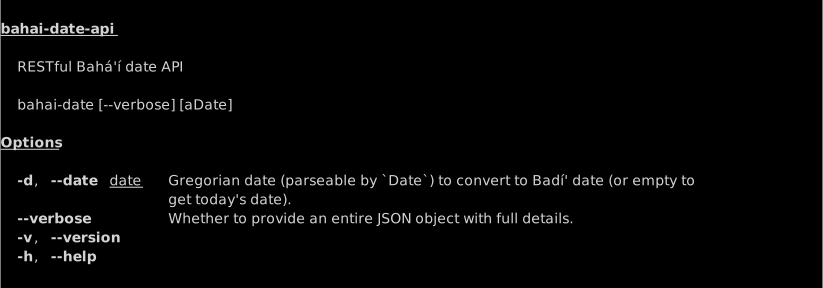
A dockerized version of Dragfyre's excellent `npm` based Badi calendar solver.
 mitch donaberger
85de20d33d
getting ready to update the docker container here
mitch donaberger
85de20d33d
getting ready to update the docker container here
|
1 vecka sedan | |
|---|---|---|
| api | 2 månader sedan | |
| bin | 2 månader sedan | |
| images | 2 månader sedan | |
| DOCKER-README.md | 2 månader sedan | |
| Dockerfile | 2 månader sedan | |
| LICENSE-ISC.txt | 2 månader sedan | |
| README.md | 1 vecka sedan | |
| createServer.js | 2 månader sedan | |
| docker-compose.yml | 2 månader sedan | |
| package.json | 2 månader sedan | |
| pnpm-lock.yaml | 2 månader sedan | |
| server.js | 2 månader sedan | |
| start.sh | 2 månader sedan |
README.md

A Dockerized Badí Calendar Solver
This is a way for users to build Dockerized versions of Dragfyre's NodeJS-based Badí Calendar solver. Now you can can get a Badí calendar date on your shell, website, or boat!
Quick Start 🚀
If you have docker installed already, you can give the server a shot by running the command docker run -d -p 1844:1844 unmolded1457/bahai-date-api. On Windows machines, that command might be docker.exe run -d -p 1844:1844 unmolded1457/bahai-date-api.
This will open up a simple HTTP server on port 1844, the same year on the Common Calendar wherein the Báb declared His station as the promised Mahdí, or, forebearer to the Messíah.
You can test it by running curl http://localhost:1844/today. If you have jq installed, try curl http://localhost:1844/today | jq -r '.message'
jq just takes the standard JSON output and allows you to extract specific values — get creative with it!
If you want some more information on how to get this permanently running as a Function as a Service, check out DOCKER-Readme.md
Baháʼí Date RESTful API
So far, there are three endpoints for this API:
POST /today
Returns today's date according to the Baháʼí/Badí' calendar via POST request.
GET /today
Returns today's date according to the Baháʼí/Badí' calendar via GET request (as HTML).
GET /date
Given a date from the Gregorian calendar defined via GET data, returns the corresponding date in the Baháʼí calendar (as JSON).
Public endpoints
Public endpoints are now available on bahai-browser.org:
/today - https://bahai-browser.org/today
/date - https://bahai-browser.org/date
Running
To launch the API server, simply navigate to the main folder and type
npm start.
Examples
From either endpoint, the output is returned in a similar format: a JSON object containing a message, a Baháʼí calendar date, and a Gregorian date/time.
Today
URL: localhost:1844/today
{
    "message": "Today is 13 Masá’il 174",
    "badi_date": {
        "year": 174,
        "month": 14,
        "day": 13,
        "month_name": "Masá’il",
        "timezone_id": "Asia/Jerusalem"
    },
    "greg_date": {
        "year": 2017,
        "month": 12,
        "day": 5,
        "hour": 23,
        "minute": 19,
        "second": 12,
        "timezoneOffset": 0
    }
}
date
Available parameters include:
yearmonthdayhourminutesecondlatitudelongitudetimezoneId
May 23, 1844
URL: localhost:1844/date?year=1844&month=5&day=23&hour=20&minute=45
Output:
{
    "message": "The date is: 8 ‘Aẓamat (Grandeur) 1 B.E.",
    "badi_date": {
        "year": 1,
        "month": 3,
        "day": 8,
        "month_name": "‘Aẓamat (Grandeur)",
        "timezone_id": "Asia/Jerusalem"
    },
    "greg_date": {
        "year": 1844,
        "month": 5,
        "day": 23,
        "hour": 20,
        "minute": 45,
        "second": 0,
        "timezoneOffset": -480
    }
}
February 15, 2014
URL: localhost:1844/date?year=2014&month=2&day=15&hour=13&minute=45
Output:
{
    "message": "The date is: 9 Mulk (Dominion) 170 B.E.",
    "badi_date": {
        "year": 170,
        "month": 18,
        "day": 9,
        "month_name": "Mulk (Dominion)",
        "timezone_id": "Asia/Jerusalem"
    },
    "greg_date": {
        "year": 2014,
        "month": 2,
        "day": 15,
        "hour": 13,
        "minute": 45,
        "second": 0,
        "timezoneOffset": -485
    }
}
CLI usage