
A little tool to launch terminal applications.
 mitch donaberger
28e1627309
Added TODO to remind myself of what i haven't done yet
mitch donaberger
28e1627309
Added TODO to remind myself of what i haven't done yet
|
2 months ago | |
|---|---|---|
| LICENSE.txt | 2 months ago | |
| README.md | 2 months ago | |
| programs.json | 2 months ago | |
| tui-launcher.sh | 2 months ago |
README.md
🚀 TUI Launcher 🚀
Welcome to TUI Launcher! A simple, yet beautiful and customizable Terminal User Interface (TUI) for launching your favorite command-line programs.
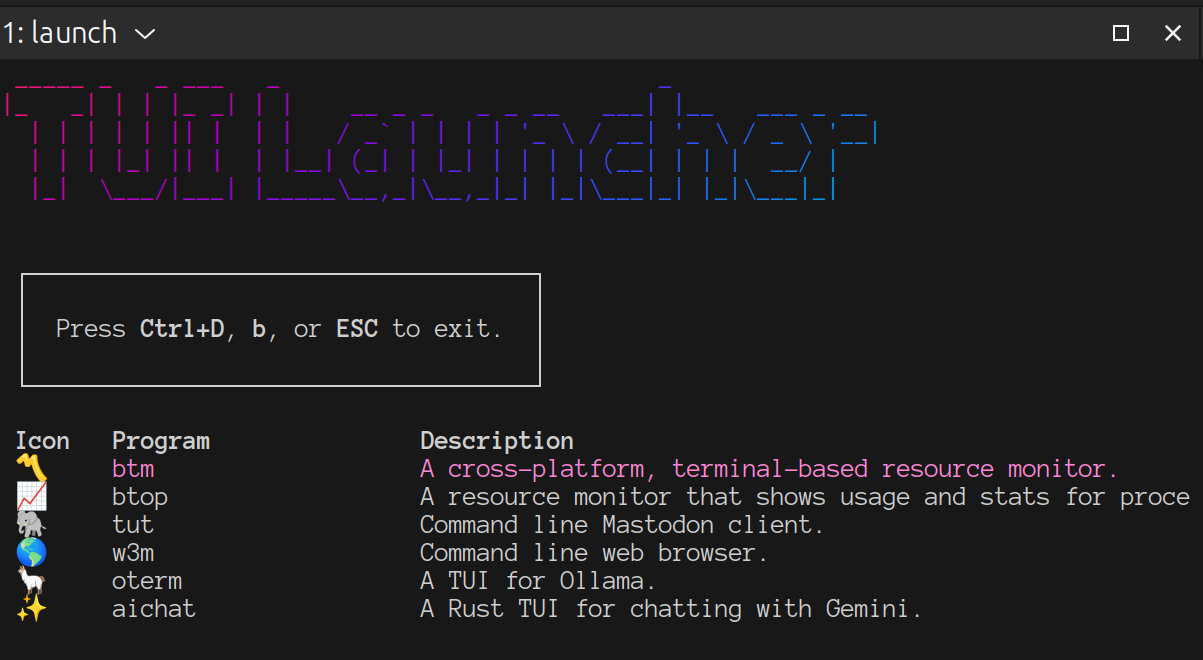
✨ Features
- 📝 Simple Configuration: Easily manage your applications with a straightforward
programs.jsonfile. - 🎨 Beautiful Interface: A visually appealing and easy-to-navigate menu, thanks to
gum,figlet, andlolcat. - ✅ Dependency Check: Automatically checks for required dependencies and helps you install them.
- ⌨️ Keyboard Navigation: Navigate the menu with your keyboard.
- 🔧 Customizable: Add your own programs, descriptions, and emojis to personalize your launcher.
⚙️ Dependencies
TUI Launcher relies on the following command-line tools:
gum: A tool for glamorous shell scripts.figlet: A program for making large letters out of ordinary text.lolcat: A tool for rainbow coloring of text in the terminal.jq: A lightweight and flexible command-line JSON processor.
The launcher will check if these are installed and prompt you to install them if they are not.
🛠️ Installation
Clone the repository:
git clone https://git.donaberger.xyz/tui-launcher.git
cd tui-launcher
Make the script executable:
chmod +x tui-launcher.shRun the launcher:
./tui-launcher.sh
🔧 Configuration
To add, remove, or modify the programs in the launcher, simply edit the programs.json file. The file is a JSON array of objects, where each object represents a program and has the following structure:
{
  "name": "Your Program Name",
  "command": "command-to-execute",
  "description": "A short description of your program.",
  "emoji": "🚀"
}
Example programs.json:
[
  {
    "name": "btm",
    "command": "btm",
    "description": "A cross-platform, terminal-based resource monitor.",
    "emoji": "〽️"
  },
  {
    "name": "btop",
    "command": "btop",
    "description": "A resource monitor that shows usage and stats for processor, memory, disks, network and processes.",
    "emoji": "📈"
  }
]
🚀 Usage
- Run the launcher:
./tui-launcher.sh - Use the arrow keys (
↑/↓) ork/jto navigate the menu. - Press
Enterto launch the selected program. - To exit the launcher, press
Ctrl+D,b, orESC.
🤝 Contributing
Contributions are welcome! If you have any ideas, suggestions, or bug reports, please open an issue or submit a pull request.
📜 License
This project is licensed under the MIT License. See the LICENSE file for details.
TODO
- Build an installer script
- Add animations to the background.